TODO Feature
LoongTeX now supports embedded TODO management! You can mark tasks with simple comments in LaTeX source code, and the system will automatically recognize them and display them centrally in the sidebar, helping you efficiently track and complete unfinished tasks in writing or data processing.
How to Use
In your .tex files, simply add comments in the following format:
% TODO 这个数据仍需代理单位处理一次
✅ Note:
- Must start with
% TODO(case-sensitive, recommended all uppercase);- Followed by a space, then write the specific task description;
- Supports cross-line, multi-file recognition.
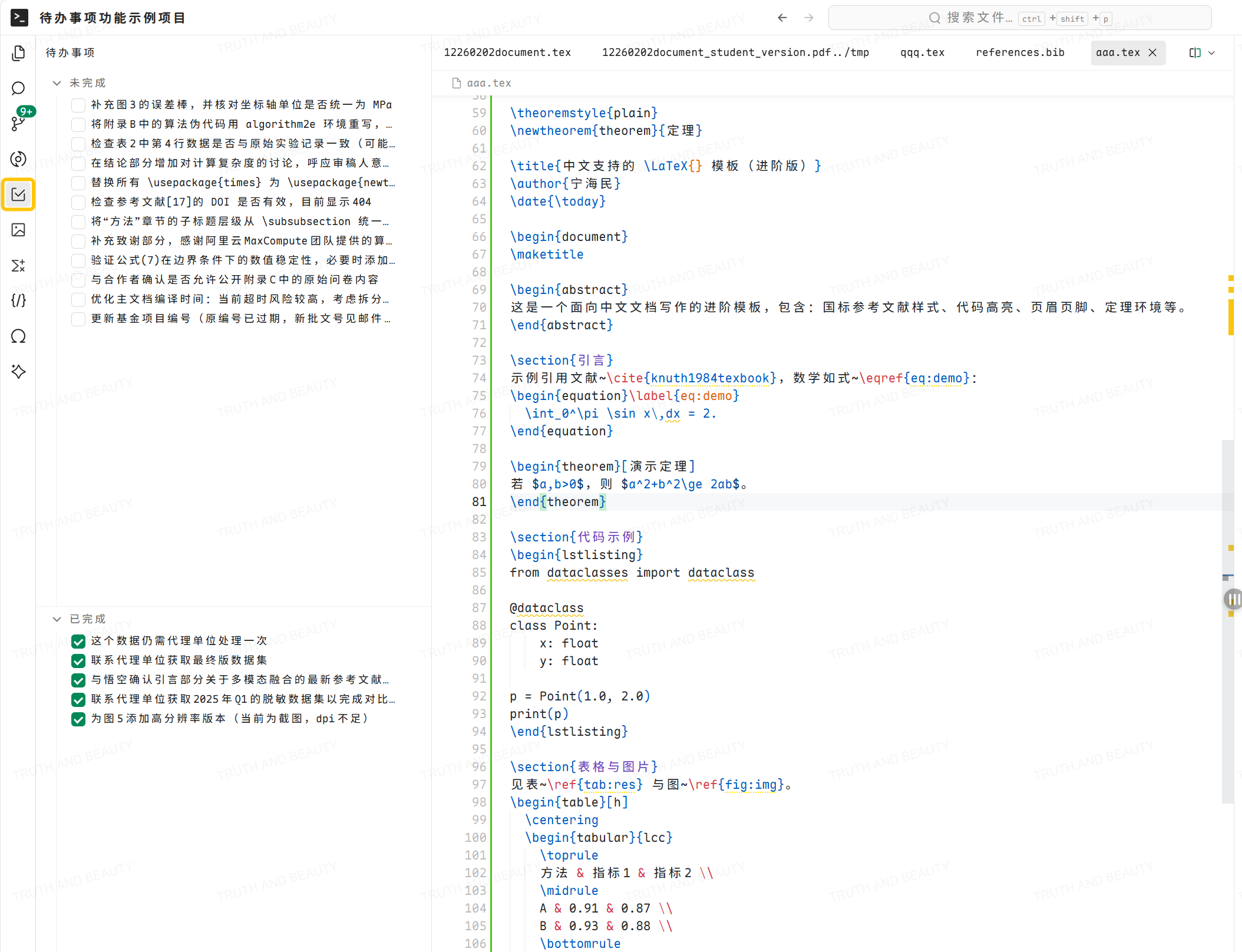
After saving the file, LoongTeX will automatically scan all .tex files in the project and summarize the recognized TODO items in the Left Navigation Bar → TODO panel.
Managing TODO Items
- In the Left Navigation Bar on the left side of the editor, click 【TODO】;
- All TODO items will be displayed in list form, for example:
- This data still needs to be processed once by the agency
- Update fund project number (original number expired, new approval number in email 2026-01-28)
- Click any item, and the editor will automatically jump to the file and line position where the comment is located;
- After processing is completed, click the item again, and the system will automatically update the comment in the source code to:
At this point, the item will be removed from the TODO list (but still retained in the source code for traceability).
% DONE This data still needs to be processed once by the agency
Advanced Notes
- Supports mainstream LaTeX source files: The system automatically scans common LaTeX-related source files in the project, including but not limited to
.tex,.sty,.cls,.bst,.dtx, etc. As long as the file content can be normally parsed by the editor, the% TODOcomments in it will be recognized; - Real-time synchronization: About 1–2 seconds after saving the file, the TODO list will automatically refresh;
- DONE items won't reappear: Even when reopening the project, completed
% DONEitems won't return to the TODO list; - Supports Chinese and English: Task descriptions can use any Unicode characters, including Chinese, formula symbols, etc.
Example Scenario
You're writing the data analysis section of your paper and temporarily lack cleaned data from a certain institution:
\subsection{实验结果}
According to preliminary statistics, the sample mean is 3.2. % TODO Contact the agency to obtain the final version dataset
Subsequent analysis is based on this assumption.
Later, when you see this task in the sidebar, click it after processing to automatically mark it as DONE, keeping the document and task status synchronized.
LoongTeX —— Making Research Happen Better
FOR TRUTH AND BEAUTY