Global Search
Feature Overview
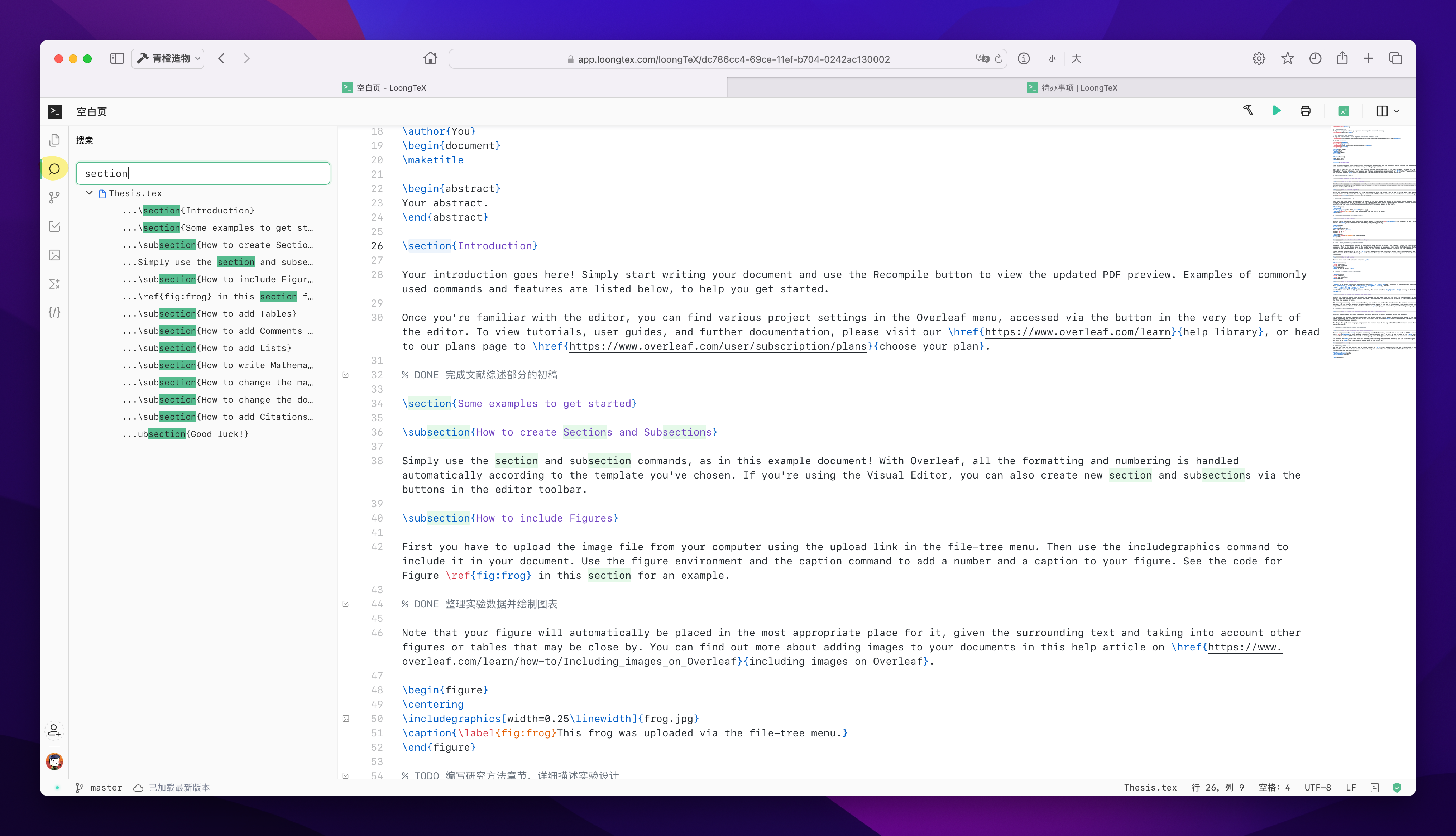
LoongTeX's newly launched global search feature aims to provide users with an efficient and convenient way to quickly find and replace text, code snippets, and files throughout the entire project or within files. This feature significantly enhances user efficiency and accuracy in academic writing, note management, and collaborative editing.
Feature Characteristics
-
Quick Search
The global search feature allows users to quickly find keywords across all files in the project, whether it's text content, code snippets, or file names, all accessible with one click. Users can input any keyword or regular expression and immediately get all matching results. -
Precise Replacement
In addition to searching, users can also use the global search feature for replacement operations. Whether it's multiple matches in a single file or the same content across multiple files, users can replace them with one click, eliminating the tedious steps of manual one-by-one search and replace. -
Support for Multiple Formats
The global search feature supports searching and replacing in multiple file formats, including but not limited to.tex,.md,.txt,.html,.js, etc., ensuring users don't need to worry about format compatibility issues during use. -
Efficient Search Algorithm
We employ an efficient search algorithm that can traverse the entire project files in a short time, ensuring users obtain the required information in the shortest possible time, improving work efficiency. -
Smart Suggestions and Highlighting
Search results are displayed in list form and sorted by relevance. Each match is highlighted to help users quickly locate it. Meanwhile, LoongTeX provides intelligent replacement suggestions to help users avoid unnecessary errors during replacement. -
Safe and Reliable
The replacement operations of the global search feature have undo functionality, ensuring users can easily undo misoperations during the process, maximizing protection of user data integrity and security.
Usage Scenarios
- Literature Management and Citation: Users can quickly find all literature citations in the project and batch replace old citation formats, ensuring citation format consistency.
- Code Segment Search and Optimization: In large projects, users can find specific code segments through global search, facilitating code refactoring and optimization.
- Quick Error Location: Helps users quickly locate spelling errors, inconsistent formats, or duplicate content in projects, improving document quality.
- Collaborative Editing: In team collaboration, users can quickly locate and edit specific content in projects, enhancing collaboration efficiency.
How to Use
- Open the Global Search Panel: In the LoongTeX main interface toolbar, click the "Global Search" icon to open the search panel.
- Enter Keywords or Regular Expressions: Enter the content to search for in the search bar, which can be simple text keywords or regular expressions for advanced searches.
- View Search Results: Matching content is displayed in real-time in the search panel, and users can click to view detailed locations.
- Execute Replacement Operations: Select the content to replace, enter the replacement text, and click the "Replace" button to complete the replacement operation.
- Undo Operations: If an operation is incorrect, users can click the "Undo" button to revert to the state before replacement.
Summary
The global search feature is another important upgrade LoongTeX has made to enhance user experience. Through this feature, users can manage and edit documents more efficiently and accurately in academic writing and project collaboration, greatly improving work efficiency and document quality. We believe this feature will become a valuable assistant for users working and learning on LoongTeX.
LoongTeX —— Making Research Happen Better
FOR TRUTH AND BEAUTY