Recommendation for Domestic LaTeX Online Platform LoongTeX

This article was originally published by one of our users on Zhihu, expressing their thoughtful experience and objective evaluation of our product. We believe this article is not only fair but also insightful, so we are specially republishing it here (images and some details have been adjusted, but the text content remains unchanged).
Generally, there are two main approaches to using LaTeX. One is to configure the environment locally or use local software, such as vscode + LaTeX, texlive, lyx, etc. The other is using online LaTeX platforms, with Overleaf being the most commonly used. Some universities also have their own Overleaf platforms, such as Peking University's former latex.pku. Each approach has its own advantages and disadvantages. Local configuration often requires users to have a thorough understanding of various LaTeX configurations. If the user is a LaTeX technology enthusiast, local compilation is perfect. However, friends who are not skilled in this area either need to download software (often cracked versions) or resort to online platforms.
I mainly use Overleaf for LaTeX, as it requires no environment setup - I can directly write using templates, and it also supports collaboration, which is very convenient for research cooperation. However, if there are any shortcomings, on one hand, Overleaf frequently experiences connection interruptions, which can be very frustrating during use. On the other hand, the price is not very attractive - $199 per year, which is about 1400 RMB annually, averaging over 100 RMB per month, which is somewhat expensive. But considering the need for multi-person paper collaboration, sometimes it's necessary to purchase it.
Recently, domestic LaTeX online platform developers contacted me and recommended their newly developed online LaTeX system called LoongTeX.
As a victim of Overleaf connection interruptions, I have been using this new platform for writing papers and notes recently. Also, considering that in the comments section of a path integral introductory article I wrote on Zhihu, some friends hoped I could organize the content into a document, I took this opportunity to rewrite this article using LoongTeX and placed it in the template library. The PDF document of the path integral introductory guide is available on Baidu Netdisk for friends who need it:
Link: https://pan.baidu.com/s/1z2imI8CTTk9dX6pO1chHFw?pwd=amit
Next, I'll briefly share the good aspects I've experienced and the areas that still need improvement.
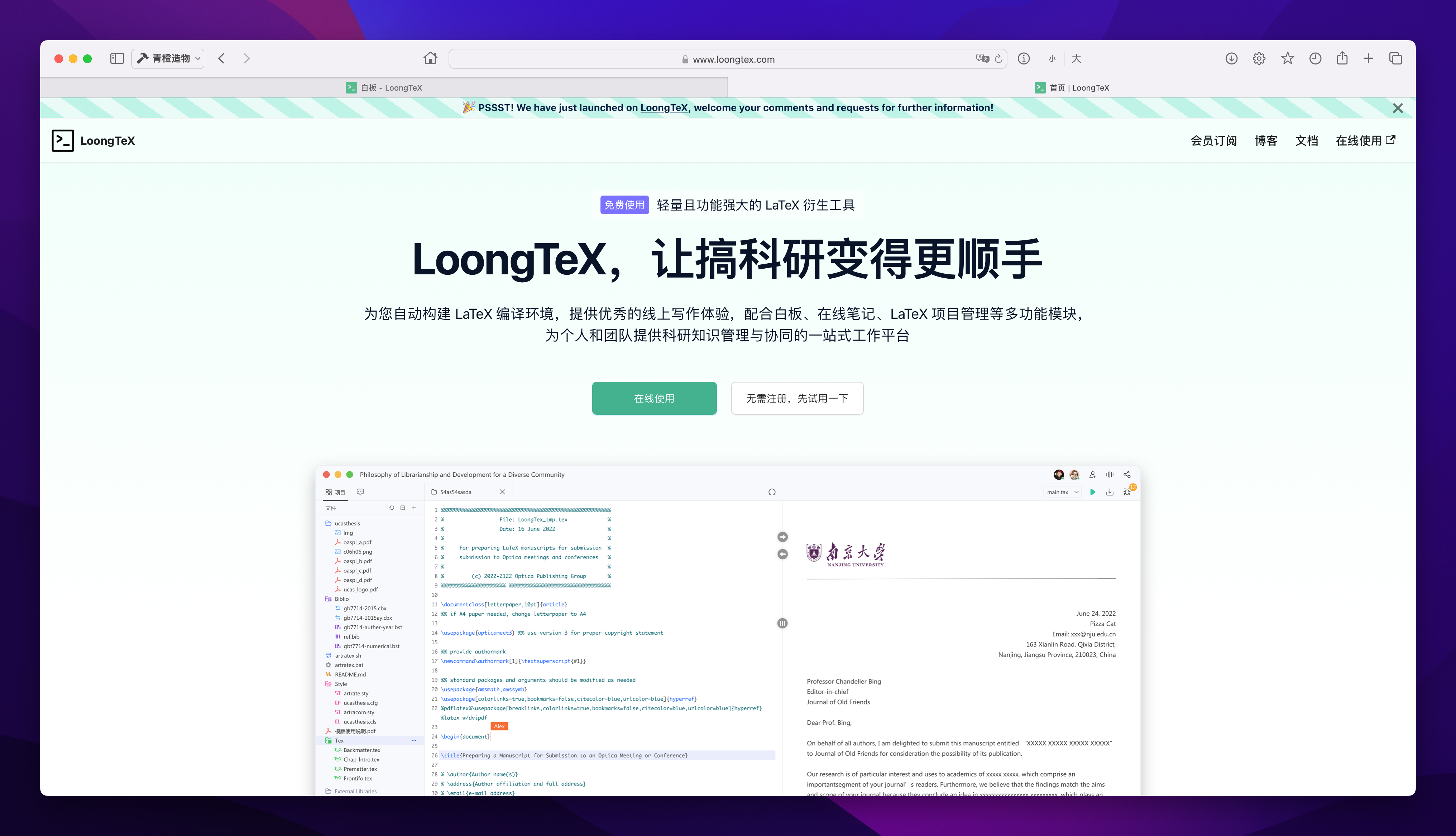
1. Good Attention to Detail
First and most importantly, it finally doesn't lag anymore. I haven't encountered any connection interruption issues during my writing, while Overleaf's connection interruptions can really drive people crazy when severe.
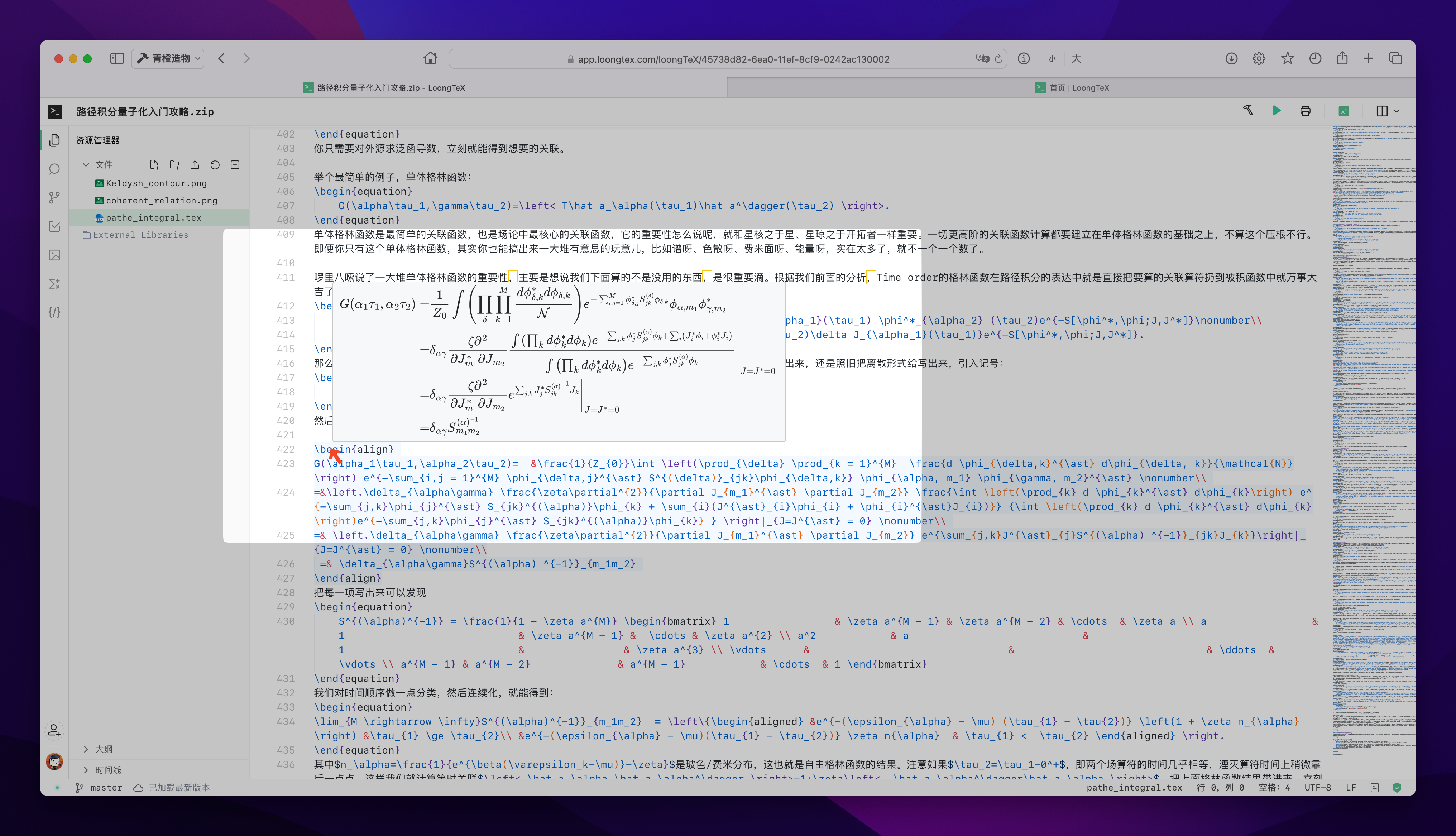
Compared to Overleaf's separation of LaTeX code area and compilation results, what I personally find better about LoongTeX is that when I move the mouse to the formula code position (at \begin{equation}) after typing a formula, the formula automatically displays, which can be considered a form of WYSIWYG (What You See Is What You Get).
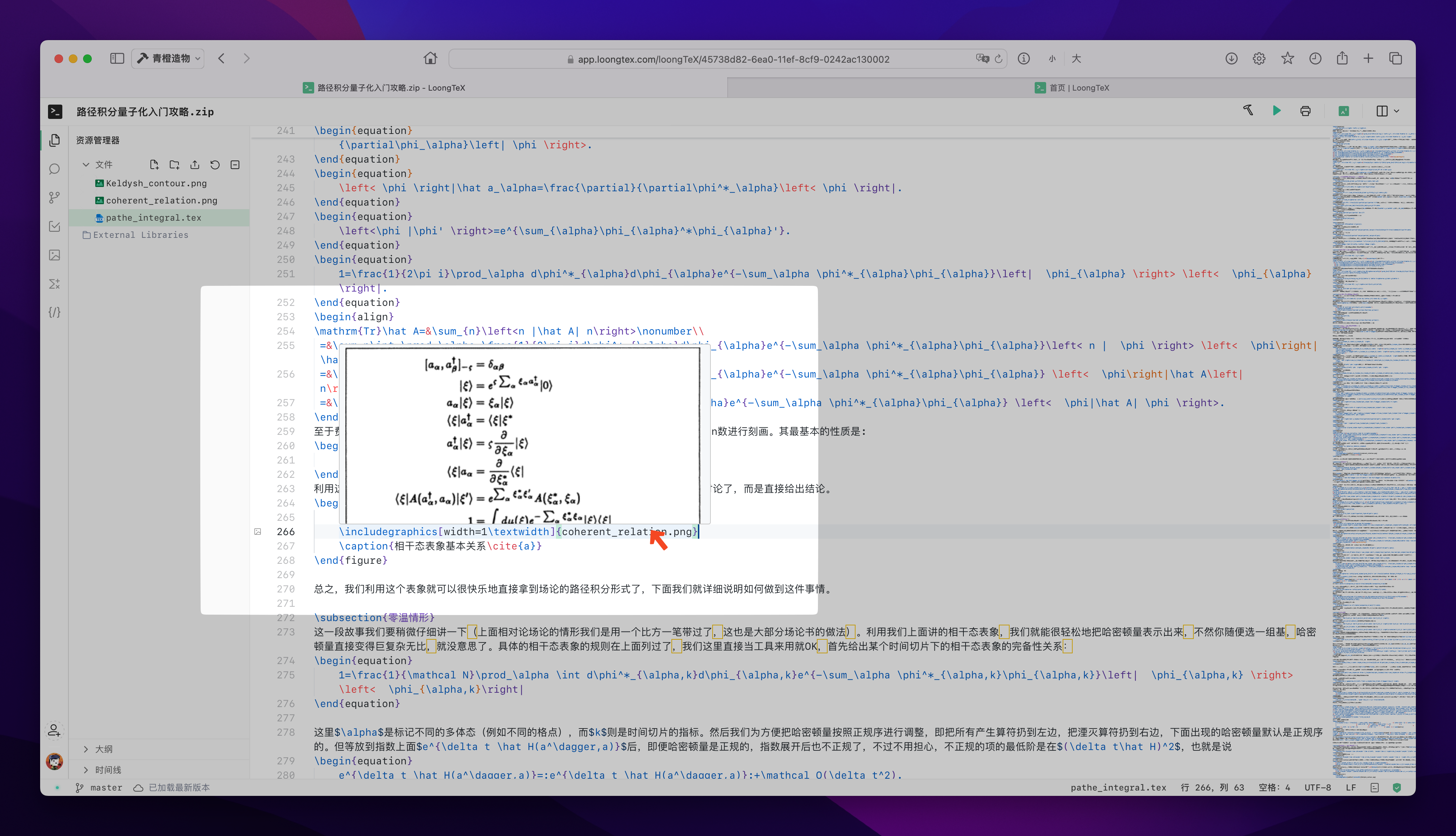
Additionally, when you move the mouse to image code (i.e., \begin{picture}), the system also shows which image is imported here, which looks quite good. However, this feature is still under development and improvement, looking forward to the complete version.
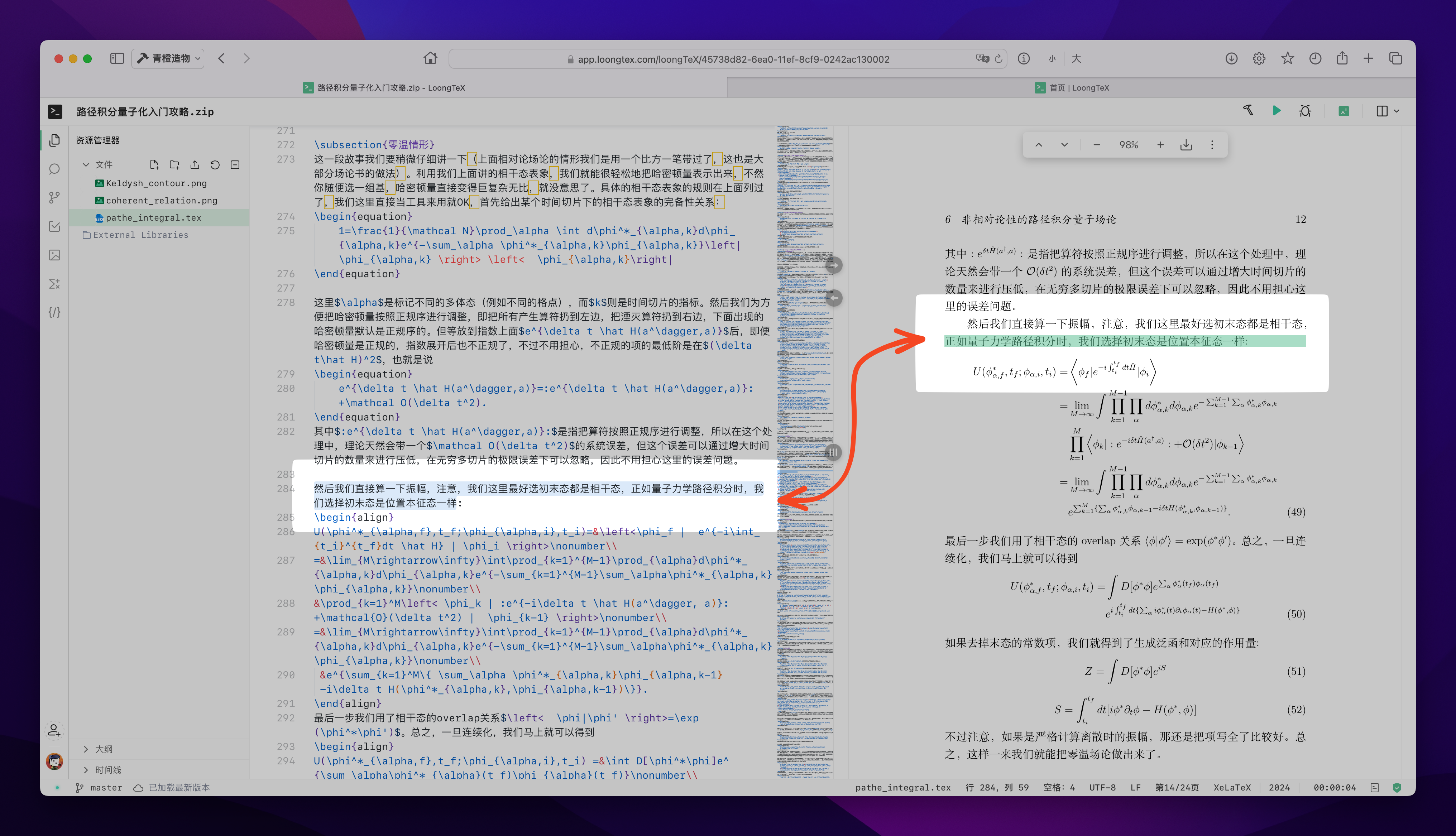
Furthermore, when we double-click to select a certain piece of text or code in the LaTeX editing area, the PDF document not only jumps to the corresponding page like Overleaf but also temporarily highlights the specific position in the PDF to indicate the exact location, which is indeed more convenient.
Regarding image import, you can even directly paste screenshots, unlike Overleaf where you need to download first and then import. Sometimes when writing Notes, casually taking screenshots and putting them in notes better matches most people's work habits.
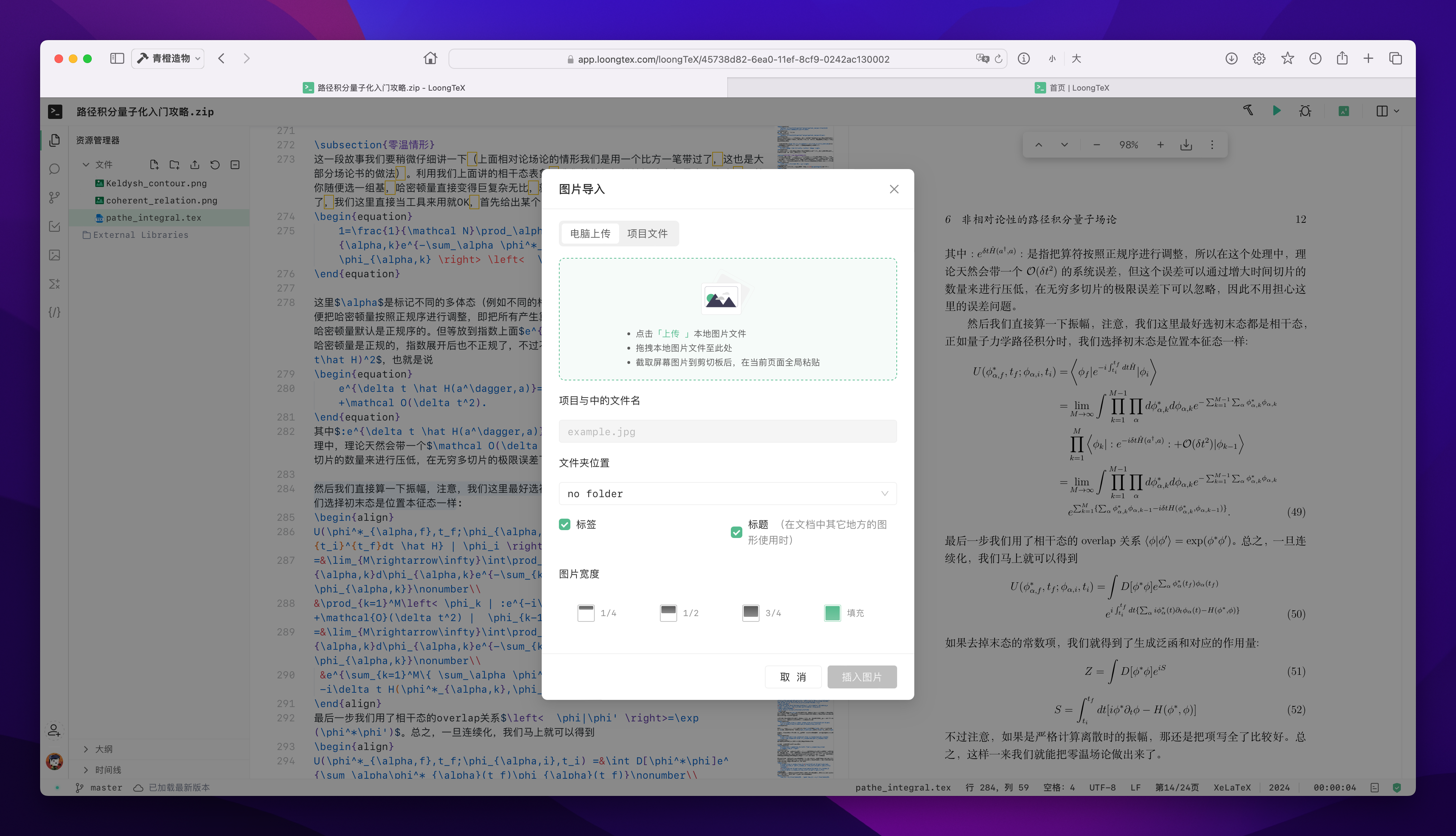
As for other aspects, I don't have many feelings. Objectively speaking, what makes a noticeable impression is either having obvious advantages compared to other products or having obvious disadvantages compared to other products. Overall, it feels quite smooth and comfortable to use.
2. AI Integration
A common problem beginners encounter when writing LaTeX is that the system reports an error, and then we don't know how to handle it, so we need to search everywhere and ask questions. What's quite amazing about LoongTeX is that they have integrated AI to solve this problem (and of course, you can also have direct AI conversations).
During my use over the past few days, I encountered a small issue when importing images, using the following code:
\begin{picture}
\centering
\includegraphics{coherent_relation.png}
\caption{Coherent State Basic Relationship\cite{a}}
\end{picture}
The imported images ended up crooked and of incorrect size. When checking the error information, I unexpectedly found that clicking on the error information would bring up AI to explain the log, and it even provided modified code at the end. When I used the AI-modified code, the problem was directly solved. I think this experience is quite impressive. In fact, many of these good designs weren't even told to me by the developers - they just recommended I try it, and I encountered quite a few pleasant surprises.
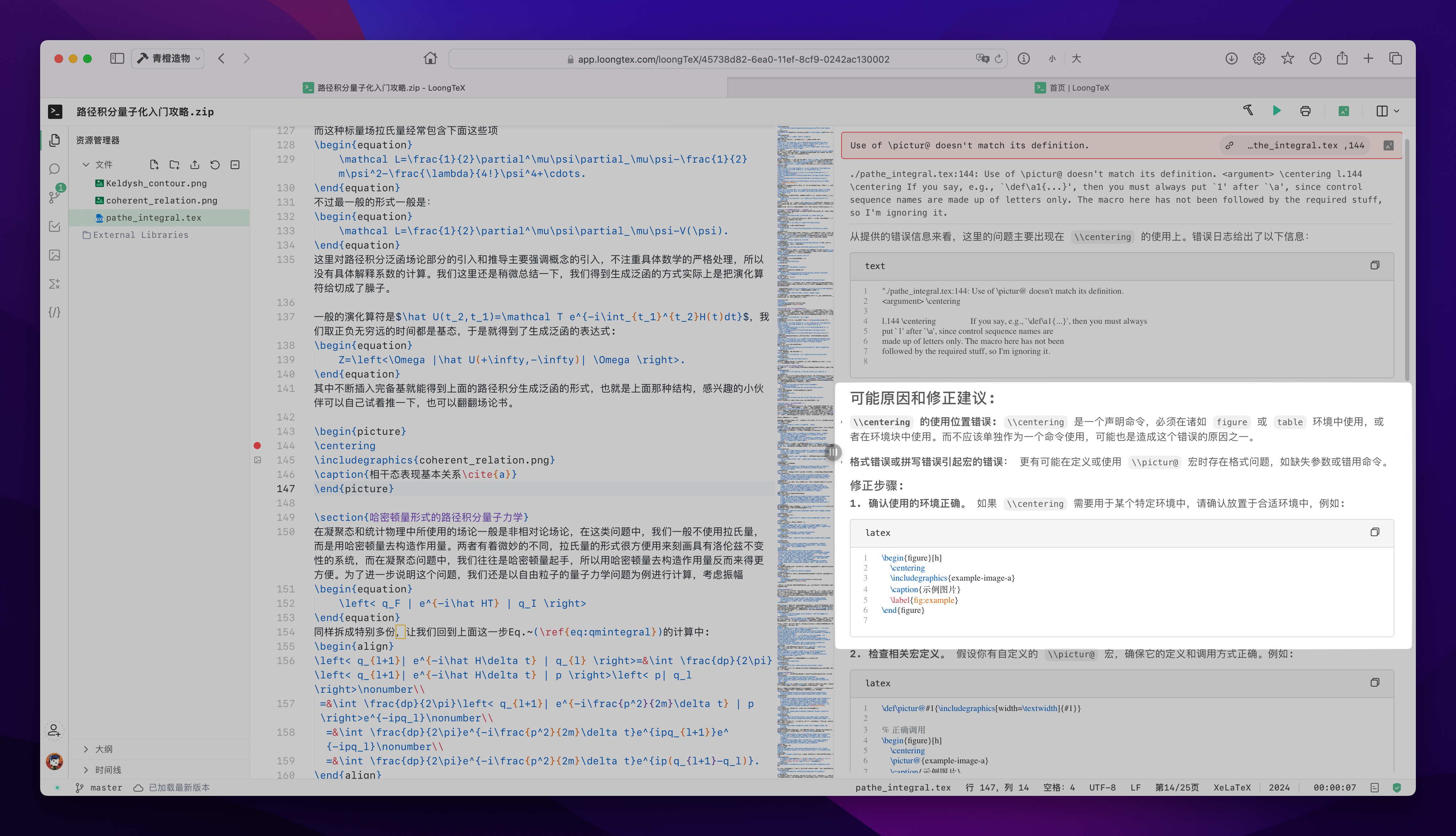
\begin{figure}[h!]
    \centering
    \includegraphics[width=1\textwidth]{coherent_relation.png}
    \caption{Coherent State Basic Relationship\cite{a}}
\end{figure}
In addition, there's also an independent AI conversation interface available in the sidebar, which is very convenient. By the way, regarding AI risk issues, I also consulted the development team. The AI does not capture our written content; the information input to AI is only what we enter in the AI interface, so there's no need to worry.
3. Price
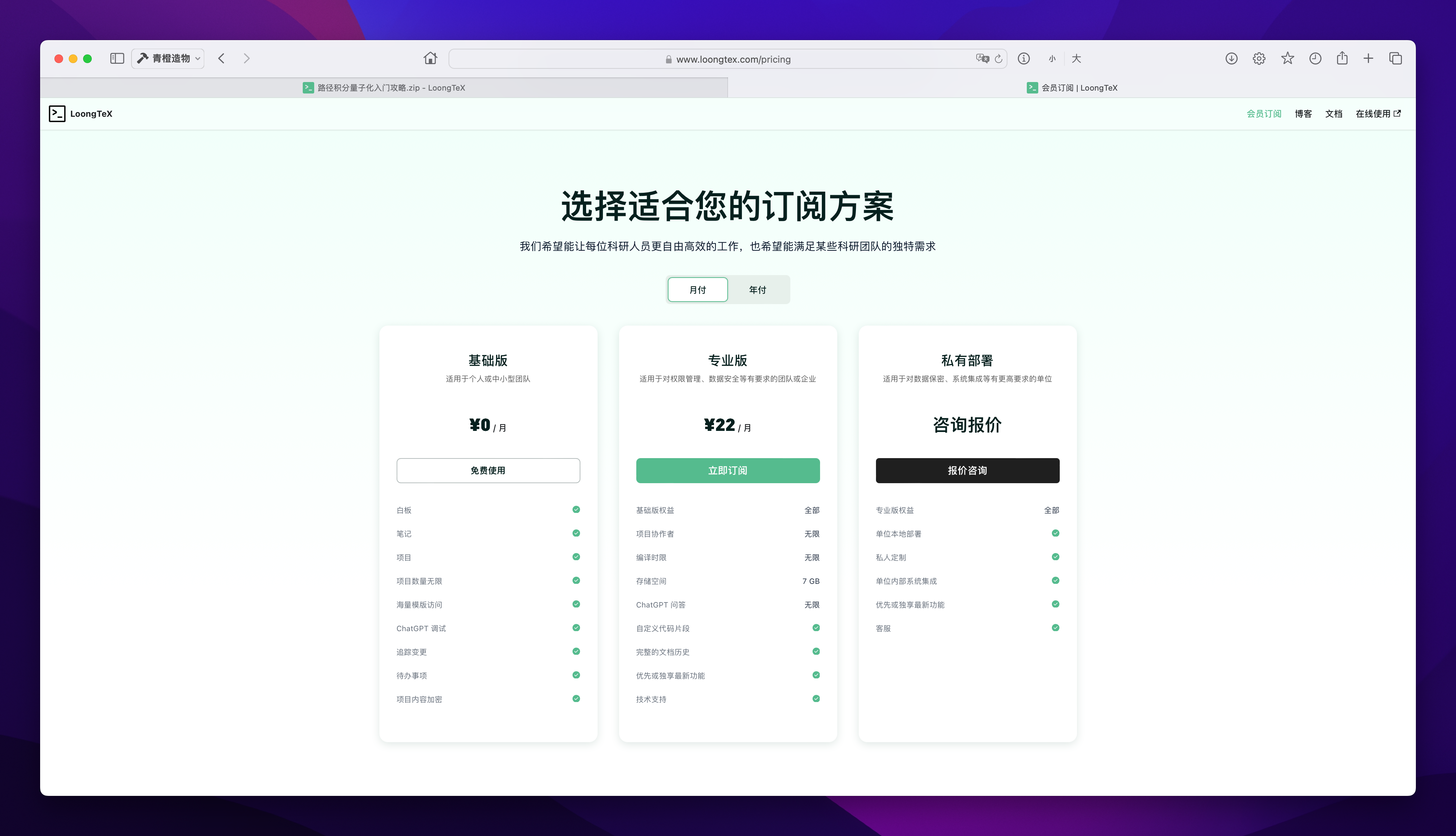
It must be said that domestic products generally excel in terms of cost-effectiveness. There's only one tier for the paid version: monthly payment of 22 RMB, annual fee of 233 RMB (monthly average 19.4), which is cheaper than subscribing to a video streaming service (complaining that video streaming services are getting more expensive these days, and there are separate TV memberships for televisions, plus advanced viewing options).
After subscribing to the membership, what I personally find most useful is unlimited remote collaboration. Other features are various enhanced packages, which I haven't experienced much, so I won't elaborate.
4. Areas Needing Optimization and Development
Actually, when I first started using it, I asked the development team if they planned to implement a feature similar to Overleaf's visual editor, since visual editing is also an important need in our daily use. They told me they wouldn't, which is slightly regrettable. However, correspondingly, they plan to implement Markdown support later. Since I use Markdown more often for writing notes, I'm looking forward to this and hope it can be released soon.
Currently, the documentation is not rich enough. I also consulted the team about this, and they seem to be frantically supplementing the documentation, even causing occasional 403 errors on the homepage due to too frequent updates (though the editing page has no issues at all). I can't help but mourn for their hair.
Additionally, compared to the well-established Overleaf that can directly submit papers to arXiv and some journals (though I haven't used this feature), LoongTeX still has a long way to go. However, it seems that projects can already be directly saved to one's own GitHub account, which is a good feature.
Furthermore, features for project sharing and setting one's own projects as public templates are still under development. I hope these can be implemented quickly. I originally wanted to directly share the project on Zhihu, but unfortunately, it's not possible yet.
5. Summary
Overall, I personally think LoongTeX is a quite excellent platform, rated as an online LaTeX editing platform more suitable for the Chinese user experience. Just the absence of connection interruption issues alone gives me enough reason to move some of my work to this platform. As for the various other small details, once you get used to them, you really can't go back. So I recommend friends like me who usually need to use LaTeX for work but aren't highly skilled in LaTeX technology to use it (especially friends suffering from Overleaf connection interruption issues). Of course, highly skilled students can also refer to it to enhance their configurations. In short, I hope domestic LaTeX platforms can develop better and better.
LoongTeX —— Making Research Happen Better
FOR TRUTH AND BEAUTY